Managing Your Team
Your HelpGuides account can have many users. Everyone you add can sign in and work on every project in the account.
Account navigation
When you're outside a project, the left navigation shows your account-level pages:
| Item | What it's for |
|---|---|
| Account | Your HelpGuides account. |
| Users | The people who can sign in to your account. |
| All Projects | Every project in the account. See Managing Projects. |
| Documentation | Opens this documentation site. |
| Logout | Signs you out. |
Inside a project, All Projects is at the bottom of the left navigation.
Roles and access
HelpGuides doesn't have roles. Every user in an account has the same access: they can edit and publish content in every project, change project settings, create API keys, add and remove other users, and delete projects. Only add people you trust with all of your projects.
Viewing users
Click Users in the left navigation. The table lists each user's Name, Username (their email address), Status and Last Logged In date.
| Status | Meaning |
|---|---|
| Valid | The user has accepted their invitation and can sign in. |
| Unverified | The user hasn't accepted their invitation yet. |
Adding a user
- On the Users page, click + Add User.
- Enter the person's Full Name and Email Address.
- Click Add user.
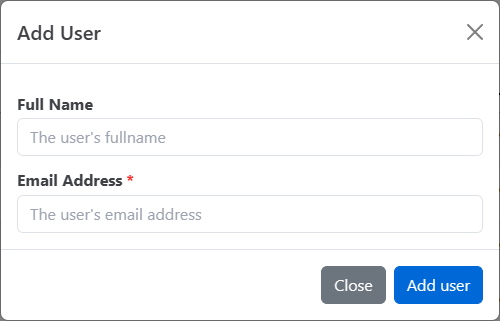
HelpGuides emails them an invitation to join your account. They appear in the table as Unverified until they accept it.
The number of users you can add depends on your plan. If you've reached your plan's limit, HelpGuides shows a message instead of adding the user.
Resending an invitation
If someone can't find their invitation, click Reinvite in their row. HelpGuides sends a new invitation email.
Removing a user
- On the Users page, click Remove in the user's row.
- In the Confirm Delete dialog, click Delete.
The user is removed from your account and can no longer sign in to it. You can't remove yourself.
Editing a user's name
Click a user's name or username to open their profile. Change their Fullname and click Update.
To change the email address someone signs in with, contact support.
Related
- Welcome to HelpGuides.io: getting started with your account.
- API Keys and the REST API: giving scripts and applications access without adding a user.
- Connecting Slack: letting your team ask questions from Slack.
- Setting Up Chat: your team can answer visitors from the chat inbox.