Review Comments and AI Agents
Review comments let you leave instructions on an article for an AI agent, such as "Update the stats to 2026". HelpGuides calls this Cowork. Any AI assistant connected to your project through Model Context Protocol can find open comments, make the edits, and mark each comment resolved with a note about what it changed. You check the result and publish it.
Leave a comment
- Open the article in the editor and click Advanced to open Advanced Article Options.
- Click the Review tab.
- Describe the change under New comment.
- Click Add Comment.
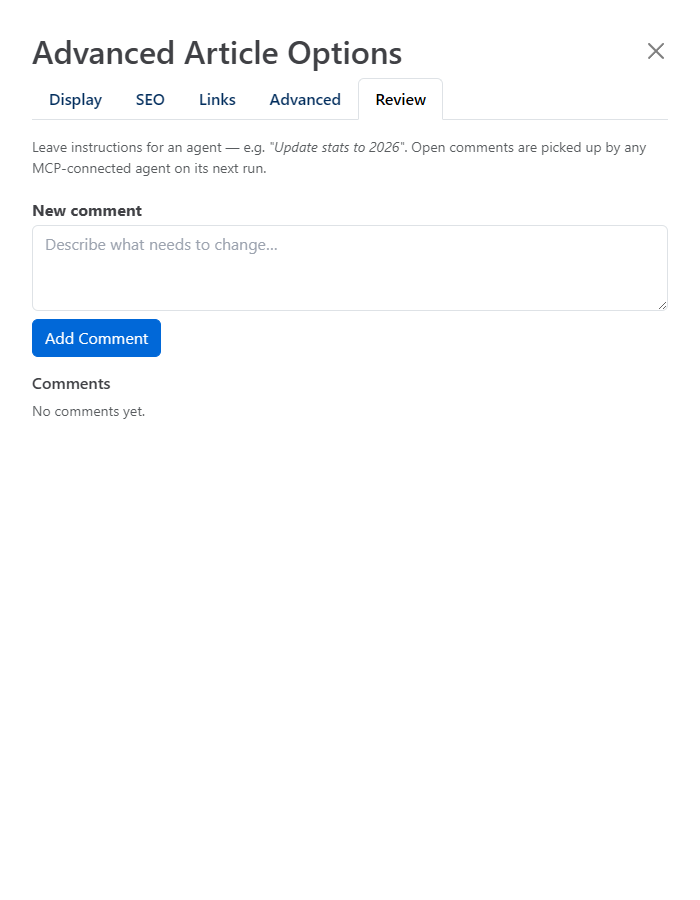
The Review tab shows a red badge with the number of open comments on the article. Open comments are picked up by any MCP-connected agent the next time it runs.
Write comments an agent can act onAsk for one change per comment and be specific: name the section, the facts to change and where the new facts come from.
Comment statuses
| Status | Meaning |
|---|---|
| Open | Waiting for someone to act on it. Only open comments count toward the badge. |
| Resolved | The requested edits were made. Shows the resolution notes and who resolved it (By Cowork for an agent). |
| Dismissed | Closed without edits, for example because the request was out of scope or a duplicate. Shows the reason, if one was given. |
You can close a comment yourself with the Resolve or Dismiss button under it.
How an agent works through comments
Connect an assistant such as Claude or ChatGPT to your project, then ask it something like "Work through the open review comments in my docs." It uses these tools:
| Tool | What it does |
|---|---|
get_articles_with_open_comments | Lists articles that have open comments, with the number of open comments on each. |
list_agent_comments | Lists every open comment in the project with its article, oldest first. |
get_comments | Returns all comments on one article, including resolved and dismissed ones, so the agent sees earlier instructions too. |
resolve_comment | Marks a comment resolved, with optional resolution_notes that summarize the edits. |
dismiss_comment | Closes a comment without edits, with an optional reason. |
A typical run: the agent lists the open comments, reads the article with get_article, edits it with update_article_blocks, then calls resolve_comment with a short note. Edits are saved as a working copy, so the live article doesn't change until you publish. See Model Context Protocol Endpoints for every tool.
Get a Slack message when a comment is resolved
With Slack connected, turn on Notify on Cowork updates in Settings on the Integrations tab. Each time a comment is resolved, Slack gets a message that links to the article and shows the comment and the resolution notes, so someone can check the draft before it's published. Dismissed comments don't send a message. See Connecting Slack.
Review and publish
Open the article to see the agent's working copy, check the changes against the comment's notes, and publish when you're happy. To give every agent standing guidance, such as tone or formatting rules, add Prompt Instructions in AI Settings.