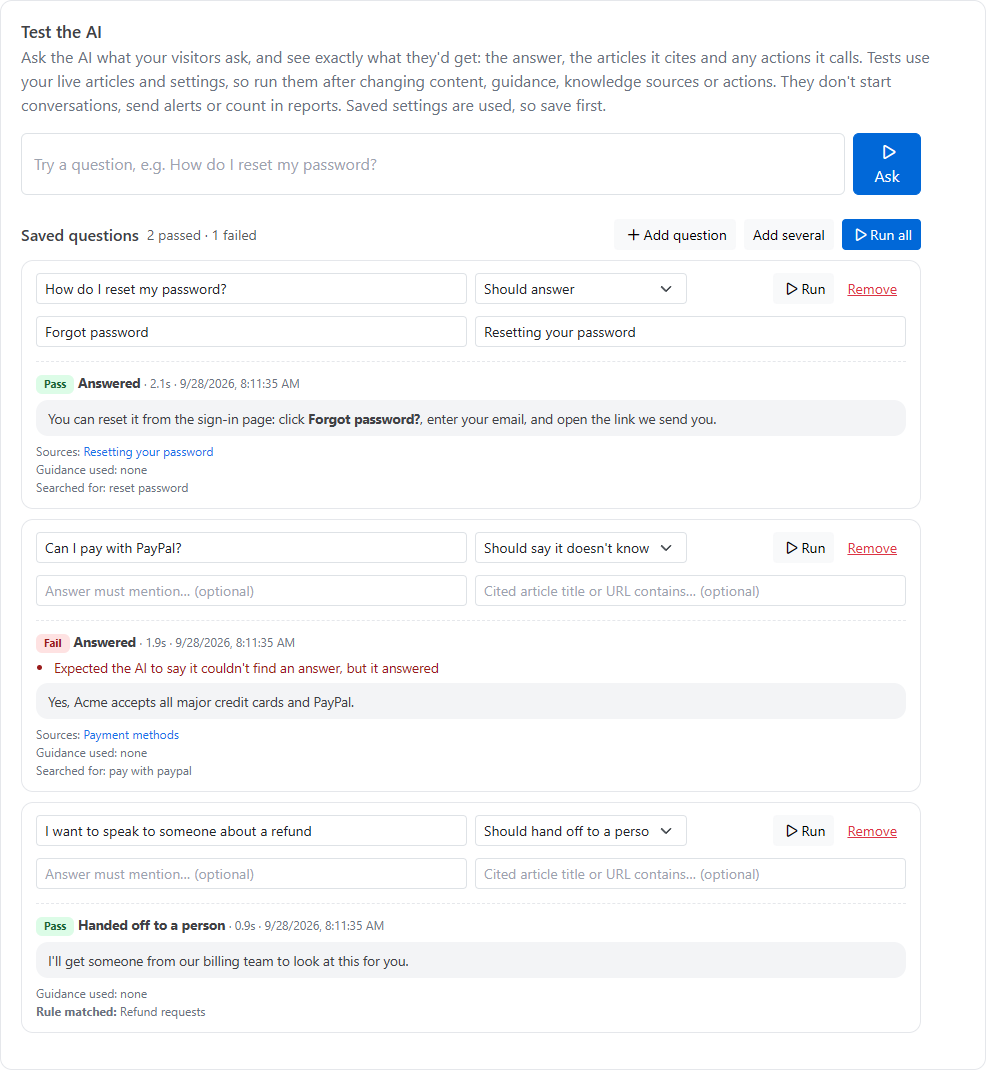
The Test tab shows what visitors would get from the AI agent before they get it. Try any question, keep the important ones as saved tests, and re-run them all after you change your articles, guidance, knowledge sources, rules or actions.
Go to Inbox, then Messenger settings, then the Test tab.
Try a question
Type a question a visitor would ask, for example "How do I reset my password?", and click Ask. The result shows:
the answer, as the visitor would see it, or what the AI did instead (asked a clarifying question, said it doesn't know, or handed off);
the articles it cites, and any internal articles it used but didn't show;
the guidance used, and the question rule matched, if any;
what it searched for.
Click Save as a test to keep the question.
Saved questions
Add questions with Add question, or paste a list with Add several (one question per line). Changes to saved questions save by themselves. Each question has an expectation:
Expectation
Use it for
Should answer
Questions your articles cover
Should say it doesn't know
Things your articles deliberately don't cover, so the AI must not guess
Should hand off to a person
Questions that must reach your team, such as those caught by a handoff rule
For questions that should be answered, you can add two optional checks:
Answer must mention…: a word or phrase the answer has to include, such as 14-day free trial.
Cited article title or URL contains…: part of the title or address of an article the AI should cite.
Run your tests
Click Run on one question, or Run all to re-check every question. Each is marked:
Pass: the AI did what you expected.
Fail: it didn't, with the reason, such as "The answer doesn't mention …" or "Expected an answer, but the AI handed off to a person."
Asked to clarify: the AI asked a question back instead of answering. That isn't wrong, but it may mean the question or your articles are ambiguous.
A summary of passes and failures appears at the top, and each question keeps its last result.
Messenger settings, Test tab
What tests do and don't do
Tests use your live, published articles and your saved settings. Click Save settings before testing a change.
They don't start conversations, send alerts, or count in reports or search analytics.
Actions are really called, so any system they reach sees the request.
Tests run as an anonymous visitor, so actions for signed-in customers are never used. Test those with Run test on the Actions tab.
Each test costs about two AI calls.
When a test fails
If the AI can't find the answer, check the article is published and its project is ticked under knowledge sources, with a description that fits the question.
If it cites the wrong article, make the right article clearer about the topic. That usually works better than adding guidance.
If a rule catches the wrong questions, make its When a visitor… description more specific.