Dashboard
The dashboard shows how readers use your site: which articles they view, what they search for and which articles they find helpful. Click Dashboard in the left navigation to open it. The page is titled Reports Dashboard.
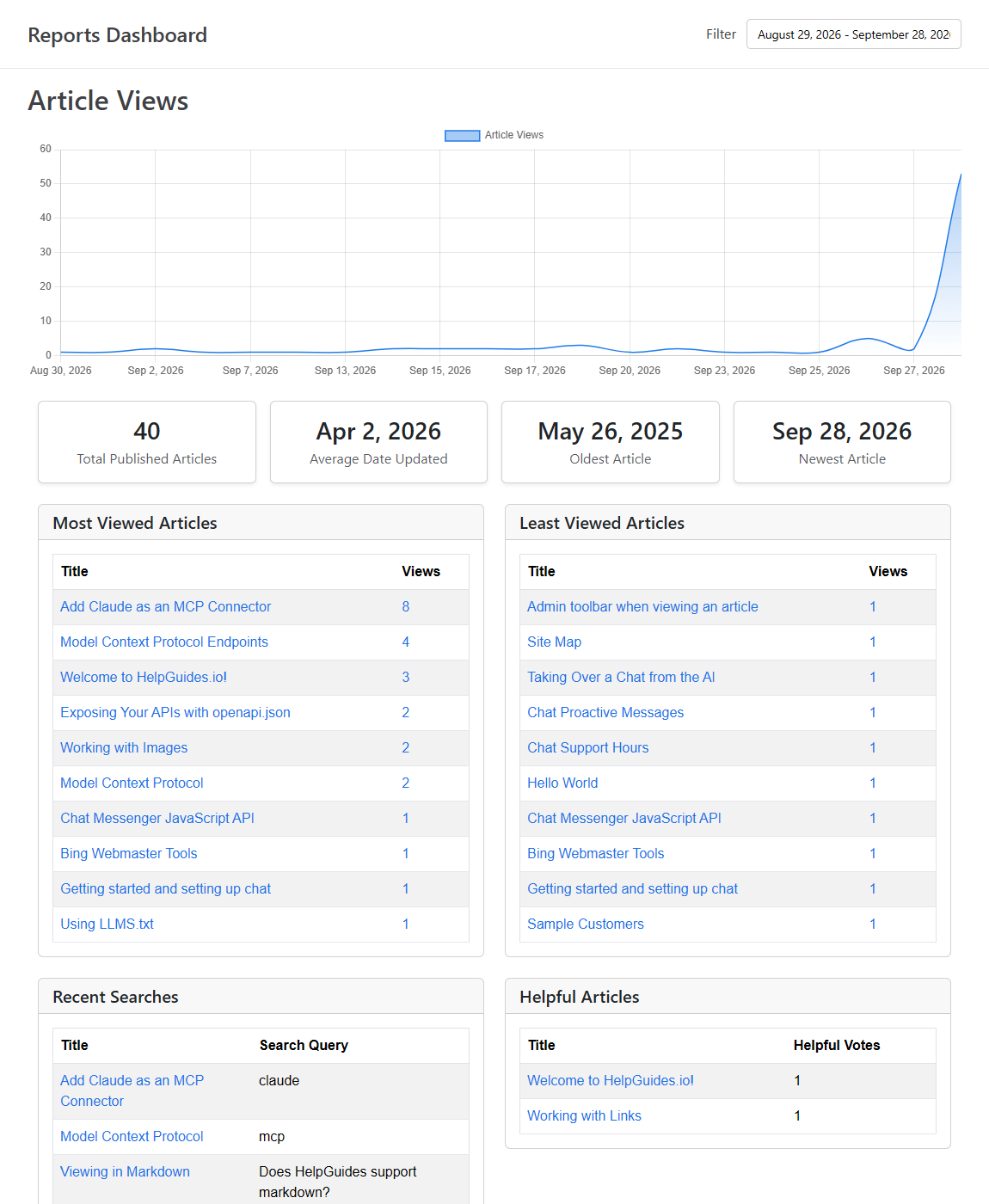
Use Filter at the top of the page to choose a date range. The range applies to the Article Views chart and to the most and least viewed articles. The other cards cover all time.
No data yet?If none of your articles were viewed in the selected date range, the dashboard shows Looks like we don't have anything to show you just yet instead of the reports. Views are counted on your published site, so publish some articles and check back, or choose a longer date range.
Article Views
A chart of total views per day across all your articles for the selected date range. Hover over a day to see its count.
Article Metrics
Four figures about your published articles: Total Published Articles, Average Date Updated, Oldest Article and Newest Article. The last three are based on when articles were last updated, so an old average date is a sign your content needs a review. See Keeping Content Fresh: Housekeeping and Stale Articles.
Most Viewed Articles
The 10 articles with the most views in the selected date range. Click a title to open the article in the editor, or click the view count to see that article's views day by day.
Least Viewed Articles
The 10 articles with the fewest views in the selected date range. These may be hard to find, poorly titled or no longer needed. As with Most Viewed Articles, click a title to edit the article or the view count to see its details.
Recent Searches
Recent searches on your site where the reader clicked through to an article, showing the article's Title and the Search Query they typed. Use it to see which topics readers look for and the words they use, and to check that searches lead to the right article.
Search None Helpful
Below search results, readers see Didn't find what you were looking for? Let us know .... When they click it, the search is recorded and listed here. These are the questions your content doesn't answer yet, so they're a good source of new articles.
Helpful Articles
The 10 articles with the most Helpful Votes. Readers vote with the thumbs up under How helpful was this article? at the end of each article. You can turn this voting on or off for an article in the editor under Advanced → Display → Show "Is Helpful" Voting.
Views for a single article
Click the view count next to any article in Most Viewed Articles or Least Viewed Articles to open its detail page. It shows a Page Views chart for the article, its Total Views for the selected date range, and a table of views by Date.
Other reports
- Housekeeping lists articles due for review and URLs that weren't found. See Keeping Content Fresh: Housekeeping and Stale Articles.
- The Not Found report shows every 404 on your site, so you can add redirects. See Redirects and Page Not Found Reports.
- SEO lists broken and outbound links. See Finding Broken Links with the SEO Report.